Week 5: Making Music
Project Overview
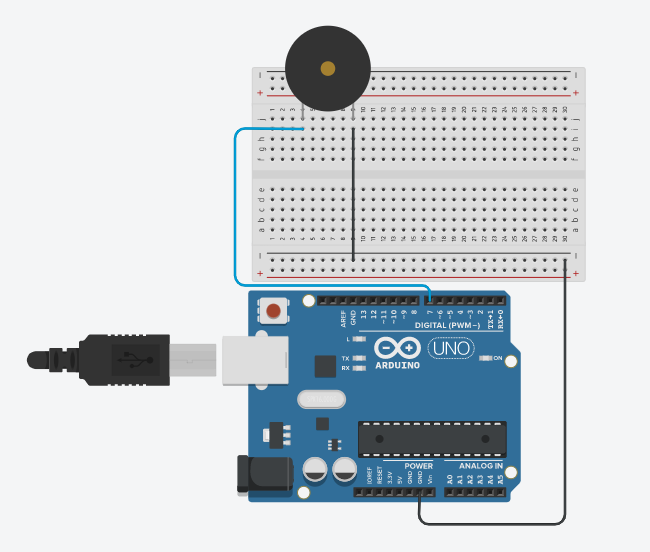
This week, I decided to push myself a little further by exploring different Arduino codes for Circuit #9—the sound circuit that lets me control tones and play simple songs exactly when I press the button. Instead of sticking to just one version, I spent time experimenting with multiple approaches, adjusting variables, rewriting functions, and testing how each change affected the sound. It became a hands-on way for me to not only understand how the buzzer responds to code, but also how timing, logic, and inputs all work together to create something interactive.
As you move through my Week 5 post, you’ll see the full breakdown of this process—what the project is designed to do, the code variations I tried, photos of my circuit, and a video walk-through of how everything performs when the button is pressed. I also share the thought process behind my decisions, what worked, what didn’t, and the small discoveries that helped me move forward. By the end, I reflect on what I learned and consider ways this circuit can be expanded, especially in real-world examples where sound is triggered by user interaction. This week really stretched my understanding, and I’m excited to share that journey with you.
Code for Song: Never Gonna Let You Down
/* RickRollCode
*/
#define a3f 208 // 208 Hz
#define b3f 233 // 233 Hz
#define b3 247 // 247 Hz
#define c4 261 // 261 Hz MIDDLE C
#define c4s 277 // 277 Hz
#define e4f 311 // 311 Hz
#define f4 349 // 349 Hz
#define a4f 415 // 415 Hz
#define b4f 466 // 466 Hz
#define b4 493 // 493 Hz
#define c5 523 // 523 Hz
#define c5s 554 // 554 Hz
#define e5f 622 // 622 Hz
#define f5 698 // 698 Hz
#define f5s 740 // 740 Hz
#define a5f 831 // 831 Hz
#define rest -1
int piezo = 7; // Connect your piezo buzzer to this pin or change it to match your circuit!
int led = LED_BUILTIN;
volatile int beatlength = 100; // determines tempo
float beatseparationconstant = 0.3;
int threshold;
int a; // part index
int b; // song index
int c; // lyric index
boolean flag;
// Parts 1 and 2 (Intro)
int song1_intro_melody[] =
{c5s, e5f, e5f, f5, a5f, f5s, f5, e5f, c5s, e5f, rest, a4f, a4f};
int song1_intro_rhythmn[] =
{6, 10, 6, 6, 1, 1, 1, 1, 6, 10, 4, 2, 10};
// Parts 3 or 5 (Verse 1)
int song1_verse1_melody[] =
{ rest, c4s, c4s, c4s, c4s, e4f, rest, c4, b3f, a3f,
rest, b3f, b3f, c4, c4s, a3f, a4f, a4f, e4f,
rest, b3f, b3f, c4, c4s, b3f, c4s, e4f, rest, c4, b3f, b3f, a3f,
rest, b3f, b3f, c4, c4s, a3f, a3f, e4f, e4f, e4f, f4, e4f,
c4s, e4f, f4, c4s, e4f, e4f, e4f, f4, e4f, a3f,
rest, b3f, c4, c4s, a3f, rest, e4f, f4, e4f
};
int song1_verse1_rhythmn[] =
{ 2, 1, 1, 1, 1, 2, 1, 1, 1, 5,
1, 1, 1, 1, 3, 1, 2, 1, 5,
1, 1, 1, 1, 1, 1, 1, 2, 1, 1, 1, 1, 3,
1, 1, 1, 1, 2, 1, 1, 1, 1, 1, 1, 4,
5, 1, 1, 1, 1, 1, 1, 1, 2, 2,
2, 1, 1, 1, 3, 1, 1, 1, 3
};
const char* lyrics_verse1[] =
{ "We're ", "no ", "strangers ", "", "to ", "love ", "", "\
\
",
"You ", "know ", "the ", "rules ", "and ", "so ", "do ", "I\
\
",
"A ", "full ", "commitment's ", "", "", "what ", "I'm ", "thinking ", "", "of", "\
\
",
"You ", "wouldn't ", "", "get ", "this ", "from ", "any ", "", "other ", "", "guy\
\
",
"I ", "just ", "wanna ", "", "tell ", "you ", "how ", "I'm ", "feeling", "\
\
",
"Gotta ", "", "make ", "you ", "understand", "", "\
\
"
};
// Parts 4 or 6 (Chorus)
int song1_chorus_melody[] =
{ b4f, b4f, a4f, a4f,
f5, f5, e5f, b4f, b4f, a4f, a4f, e5f, e5f, c5s, c5, b4f,
c5s, c5s, c5s, c5s,
c5s, e5f, c5, b4f, a4f, a4f, a4f, e5f, c5s,
b4f, b4f, a4f, a4f,
f5, f5, e5f, b4f, b4f, a4f, a4f, a5f, c5, c5s, c5, b4f,
c5s, c5s, c5s, c5s,
c5s, e5f, c5, b4f, a4f, rest, a4f, e5f, c5s, rest
};
int song1_chorus_rhythmn[] =
{ 1, 1, 1, 1,
3, 3, 6, 1, 1, 1, 1, 3, 3, 3, 1, 2,
1, 1, 1, 1,
3, 3, 3, 1, 2, 2, 2, 4, 8,
1, 1, 1, 1,
3, 3, 6, 1, 1, 1, 1, 3, 3, 3, 1, 2,
1, 1, 1, 1,
3, 3, 3, 1, 2, 2, 2, 4, 8, 4
};
const char* lyrics_chorus[] =
{ "Never ", "", "gonna ", "", "give ", "you ", "up\
\
",
"Never ", "", "gonna ", "", "let ", "you ", "down", "", "\
\
",
"Never ", "", "gonna ", "", "run ", "around ", "", "", "", "and ", "desert ", "", "you\
\
",
"Never ", "", "gonna ", "", "make ", "you ", "cry\
\
",
"Never ", "", "gonna ", "", "say ", "goodbye ", "", "", "\
\
",
"Never ", "", "gonna ", "", "tell ", "a ", "lie ", "", "", "and ", "hurt ", "you\
\
"
};
void setup()
{
pinMode(piezo, OUTPUT);
pinMode(led, OUTPUT);
digitalWrite(led, LOW);
Serial.begin(9600);
flag = true;
a = 4;
b = 0;
c = 0;
}
void loop()
{
// play next step in song
if (flag == true) {
play();
}
}
void play() {
int notelength;
if (a == 1 || a == 2) {
// intro
notelength = beatlength * song1_intro_rhythmn[b];
if (song1_intro_melody[b] > 0) {
digitalWrite(led, HIGH);
tone(piezo, song1_intro_melody[b], notelength);
}
b++;
if (b >= sizeof(song1_intro_melody) / sizeof(int)) {
a++;
b = 0;
c = 0;
}
}
else if (a == 3 || a == 5) {
// verse
notelength = beatlength * 2 * song1_verse1_rhythmn[b];
if (song1_verse1_melody[b] > 0) {
digitalWrite(led, HIGH);
Serial.print(lyrics_verse1[c]);
tone(piezo, song1_verse1_melody[b], notelength);
c++;
}
b++;
if (b >= sizeof(song1_verse1_melody) / sizeof(int)) {
a++;
b = 0;
c = 0;
}
}
else if (a == 4 || a == 6) {
// chorus
notelength = beatlength * song1_chorus_rhythmn[b];
if (song1_chorus_melody[b] > 0) {
digitalWrite(led, HIGH);
Serial.print(lyrics_chorus[c]);
tone(piezo, song1_chorus_melody[b], notelength);
c++;
}
b++;
if (b >= sizeof(song1_chorus_melody) / sizeof(int)) {
Serial.println("");
a++;
b = 0;
c = 0;
}
}
delay(notelength);
noTone(piezo);
digitalWrite(led, LOW);
delay(notelength * beatseparationconstant);
if (a == 7) { // loop back around to beginning of song
a = 1;
}
}
Picture of the Circuit

Diagram
Video
Final Reflection
When I look back over this week’s work with Circuit #9, I feel a deep sense of satisfaction — not just because I got the button-activated sound circuit working, but because I stretched myself in new ways. Experimenting with different code versions forced me to think more deliberately about timing, logic, and how small shifts change the experience when I press the button. There were moments of frustration — a tone that sounded a little off, or a delay that felt awkward — but I learned so much by iterating. In pushing through those bumps, I began to understand more deeply how the Arduino, the buzzer, and even the waiting time between notes collaborate to create something that feels alive and responsive.
Beyond the technical wins, this project gave me space to reflect on creativity and interaction. It’s one thing to write code, but it’s another to sculpt a little musical moment that responds to me — and that’s where the joy is. I’m excited about how this could be extended: maybe I build a system that plays different songs based on different buttons, or tie in LEDs that blink in sync with the melody. More than anything, I feel encouraged: I don’t just know how this works under the hood now, I feel like I can make it my own, and use that understanding in future projects.